Scope: This audit guide covers DLC, expansion, and season pass key dependencies on gray-market storefronts—not base-game key provenance or shared-account schemes. For post-redemption failures, see Game Key Activation Errors. For territory mismatches that block both base and DLC keys, see Regional Restrictions. For mislabeled DLC disputes, see Game Key Dispute Guide. LicenseAudit is an independent research resource; we do not sell keys and are not affiliated with Valve, Epic, Ubisoft, or other platform vendors.
Gray-market sellers routinely mislabel standalone DLCs, expansions, and season passes as discounted full games. The listing shows a recognizable AAA title at 70–85% below MSRP; the delivered code maps to a child AppID with a hard dependency on a parent base game you do not own. Redemption then fails with Steam’s requires ownership of another product error—or the key activates but delivers content you cannot launch.
This is not a hardware fault, a corrupt download, or a temporary server outage. It is a license topology mismatch: you purchased an add-on entitlement when you expected a root executable license. Understanding how platforms encode that dependency—and how sellers exploit listing ambiguity—is the difference between a valid bargain and a dispute you may lose because the fine print technically disclosed “DLC.”
DLC Key vs Full Game Key
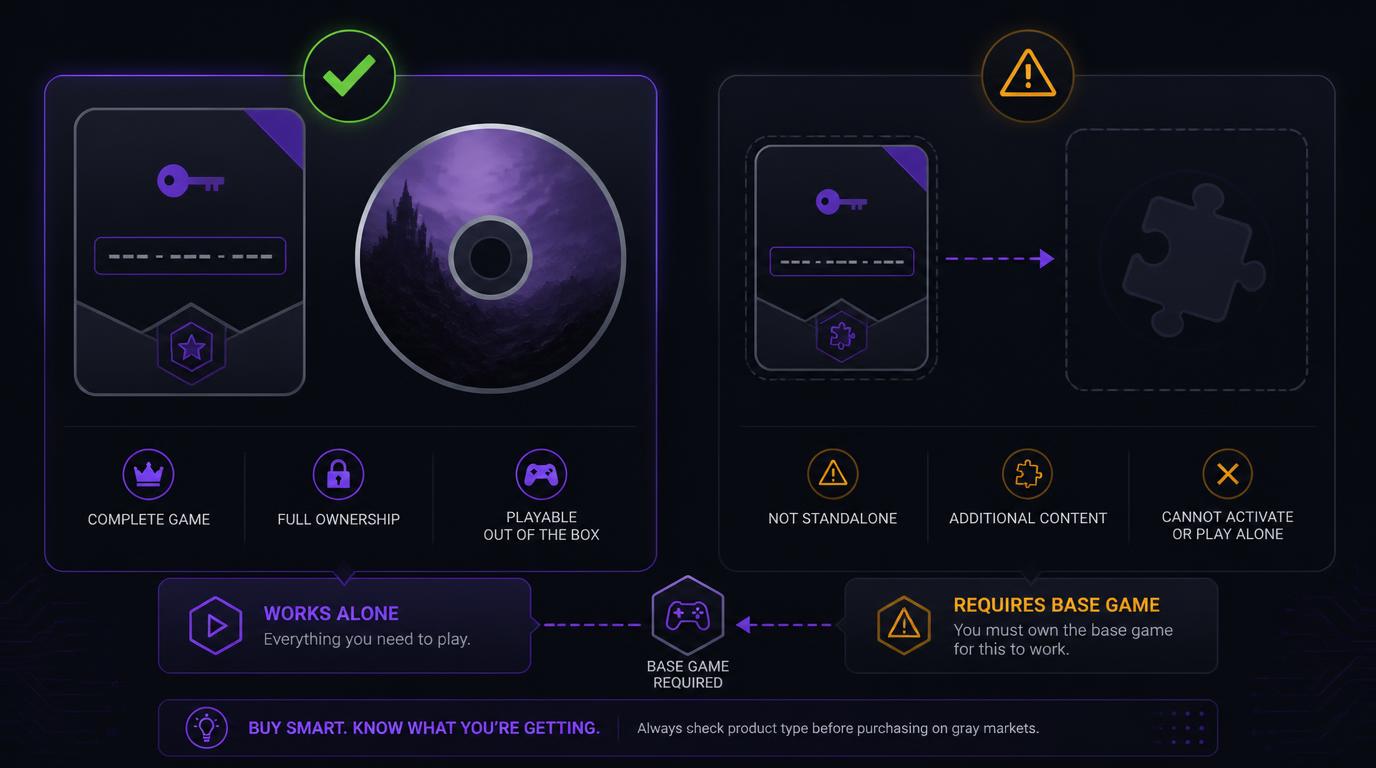
The dlc key vs full game key gray market distinction is structural, not cosmetic. Both arrive as alphanumeric activation codes, but they resolve to fundamentally different package definitions inside each platform’s entitlement system.
What a Base Game Key Contains
A full game key redeems against a root AppID (Steam) or primary product SKU (console stores). On Steam, successful activation writes a permanent license record to your account and injects a complete Content Description Record (CDR) graph:
- Executable rights: Launch tokens for the primary game binary and default depots.
- Full manifest chain: Base depots, shared engine depots, and platform middleware packages required to run the title standalone.
- No upstream dependency: The AppID’s
parent_appidfield is zero or self-referential; the license server treats it as an independently ownable product. - Store visibility: After redemption, the title appears in your library with a Play button—not nested under another game’s manage-DLC panel only.
What a DLC / Expansion Key Contains
A DLC key maps to a child AppID whose Steamworks metadata declares one or more parent applications. The key grants:
- Content manifests only: Additional depots—maps, campaigns, cosmetic packs, soundtrack files—without a standalone executable path.
- Dependent package IDs: SubIDs in the key batch tie redemption to packages that reference
extended_appidsor explicitdlcappidlinks in the parent’s appinfo record. - Conditional injection: CDRs for DLC depots merge into your account only after the license backend confirms permanent ownership of every declared parent AppID on the same profile.
- No launch surface: The child AppID may appear in your library, but Steam will not mount its depots until the base game’s license bit is set.
Gray-market arbitrage amplifies the confusion. Bundle surplus often yields cheap DLC sub-keys extracted from all-in-one retail packs; sellers list them beside full-game keys using identical artwork. Season Pass keys compound the problem: they are meta-packages bundling future child AppIDs, still gated by base ownership, yet marketed with the base game’s marketing assets.
Audit principle: Price alone is not a reliable signal. A $8 listing for a $60 title is frequently a DLC sub-key, not a pricing anomaly on the root AppID. Verify product type before checkout, not after the error screen.
Requires Ownership of Another Product Explained
When buyers search for steam dlc key requires ownership of another product, they have usually hit Steam’s parent-app validation during CD key registration. The message appears in the Steam client’s activation flow (Games → Activate a Product on Steam) after the key format validates but before any depot download begins.
CDR and License-Server Mechanics
Steam’s activation pipeline performs these steps for every third-party key:
- Key-to-Package resolution: The submitted code resolves to a PackageID (subID) and one or more AppIDs authorized by that package.
- Appinfo dependency walk: For each AppID, the backend reads appinfo blobs (via Steamworks SDK structures mirrored on the client) including
common.parent,extended.dlcforappid, and associated depot ownership requirements. - Account license scan: The license server queries your account’s persistent entitlement table for each required parent AppID. Subscription grants, temporary promotions, and Family Sharing borrow records are evaluated separately—most do not satisfy the permanent ownership bit DLC packages require.
- CDR injection or rejection: If all parents are owned, child depot CDRs merge into your account and sync to the client. If any parent is missing, activation aborts with requires ownership of another product and no partial license is written.
Attempting a DLC Key Without Base Game
A dlc key without base game cannot succeed on first-party PC platforms that enforce hard dependencies. This is by design: publishers define child AppIDs so add-on revenue cannot be captured without a root license. Steam does not offer a “hold in inventory” state for orphaned DLC keys—the transaction is atomic pass/fail.
Common buyer misconceptions at this stage:
- “I installed the game from another source.” Pirated files, repacks, or borrowed installs do not create Steam license records. The dependency check reads entitlements, not disk contents.
- “I play through Game Pass.” Microsoft subscription access does not populate Steam’s parent AppID field. See edge cases below.
- “The seller said it was the full game.” Steam validates cryptographic product mapping, not marketplace headlines. Evidence for disputes must include listing screenshots showing the mislabel.
Compatibility Lookup Table
Use this matrix before you buy dlc key separately steam or on any third-party marketplace. Product naming varies; enforcement logic does not.
| Listing Type | What Is Actually Required in Library | Platform Rule & Enforcement Mechanism |
|---|---|---|
| Standalone DLC (single expansion, cosmetic pack, soundtrack) | Permanent base-game license on the same account and storefront | Steam: Parent AppID check via CDR pipeline; hard fail if missing. Epic: Offer dependency on base catalog item ID. Ubisoft Connect: Base game registered to same Ubisoft account; external Steam base does not cross-validate. |
| Season Pass (future DLC bundle key) | Base game owned before pass redemption; individual child DLCs may unlock asynchronously as they release | Steam: Pass AppID carries parent dependency; child keys inherit same gate. Epic: Season pass offer linked to base offer ID. Ubisoft Connect: Pass tied to base SKU in account entitlement graph. |
| Bundle (base + DLC single key) | Nothing pre-existing; one key grants multiple AppIDs atomically | Steam: Multi-AppID package; all licenses written in one transaction. Epic / Ubisoft: Bundle offer grants all constituent SKUs simultaneously. |
| Base Game Required (explicit add-on listing) | Same as Standalone DLC; seller discloses dependency but buyer skips verification | Identical enforcement to Standalone DLC row. Misleading artwork remains a marketplace dispute issue, not a platform bypass. |
| Full Game Key (root AppID) | No prior ownership required | Steam: Root package with no parent_appid constraint. Epic / Ubisoft: Primary product SKU; standalone launch rights. |
Critical Edge Cases & Technical Pitfalls
Game Pass Base + Steam DLC Key
Xbox Game Pass for PC grants time-limited access to Microsoft Store or Xbox-app builds. It does not create a Steam license row for the same franchise. If you attempt to redeem a third-party Steam DLC key while only holding Game Pass access, Steam’s parent-app scan returns empty—even though you can launch the base game through the Xbox app.
The failure mode is an ecosystem mismatch, not a broken key. Resolution requires purchasing the base game on Steam (or receiving a Steam base key) so the parent AppID bit is set on the profile where the DLC key must live. Cross-platform save sync does not bridge entitlement systems.
Family Sharing Limitations
Steam Family Sharing lets authorized devices borrow play access from a lender’s library. Borrowed access is not equivalent to owned entitlements for CD key redemption purposes. A secondary sub-account that plays the base game only through Family Sharing cannot activate a gray-market DLC key on that sub-account—the license server checks the redeeming account’s owned table, not the lender’s shared catalog.
Operational workaround: redeem the DLC key on the account that directly owns the base game, then rely on Family Sharing rules for play access—subject to publisher opt-outs and simultaneous-play restrictions. Redemption and borrowing are separate permission layers.
Launcher Mismatch: GOG Base vs. Steam DLC
GOG and Steam distribute different build chains for many titles. Owning the base game on GOG (DRM-free or Galaxy-managed) does not satisfy Steam’s parent AppID requirement for a Steam DLC key. The same applies in reverse: Steam base ownership does not unlock GOG-exclusive expansions.
Ubisoft Connect and Epic create additional silos. A Steam DLC key for an Ubisoft-published title may require not only Steam base ownership but also linking to a Ubisoft account with the correct entitlement sync—yet still fail if only the Ubisoft Connect base exists without the Steam parent AppID.
Analyst note: Cross-store “I already own the game” arguments fail at the license-record layer every time. Treat storefront alignment as a hard pre-purchase filter, not a post-purchase support ticket.
Pre-Purchase Checklist & Buyer Protection
Before checkout on any gray-market listing, run this audit sequence. It takes minutes and prevents the most common DLC mis-purchase patterns.
- Parse listing metadata, not hero art. Search the title for “DLC,” “expansion,” “season pass,” “add-on,” “requires base game,” or “Steam Gift” sub-product language. Headlines quoting the franchise name alone are unreliable.
- Resolve AppIDs on SteamDB. If the seller discloses a Steam AppID—or you can infer it from the listing—open the SteamDB entry. Check App Type (Game vs DLC vs Music vs Demo) and the Parent App field. A non-zero parent confirms add-on status.
- Verify subID / package dependencies. On SteamDB’s Packages tab, inspect which AppIDs the key package grants. Single child AppID packages are DLC keys even when the store page screenshot shows base-game cover art.
- Confirm base ownership on the target account. Log into the Steam profile you will use for redemption. The base title must show as owned—not merely installed, not Family Shared, not Game Pass on another ecosystem.
- Match region and platform tags. DLC keys inherit the same territory locks as base games. Cross-check seller region labels against your account country using our Regional Restrictions guide.
- Activate base before DLC in multi-key orders. If you purchased a bundle with separate keys, redeem the root AppID key first, confirm library injection, then redeem add-on keys in the same session.
- Use escrow-protected marketplaces. Platforms with held funds until activation confirmation give you dispute leverage when a seller delivers a DLC key mislabeled as a full game. Screenshot the listing, invoice, and exact Steam error before the escrow window closes. See our Safety Guide and Game Key Dispute Guide for evidence standards.
If activation fails with requires ownership of another product, treat it as a product-category mismatch until proven otherwise. Cross-reference our Game Key Activation Errors guide for dispute timing and error documentation.
Frequently Asked Questions
No. Steam’s license server requires a permanent parent AppID entitlement on the same account before child depot CDRs inject. Disk installs, pirated copies, Game Pass access, and Family Sharing borrow rights do not satisfy the ownership check for CD key redemption.
Activation fails. Epic and Steam maintain separate entitlement silos. Owning the base game on Epic does not populate Steam’s parent AppID field. You must own the base title on Steam—via direct purchase or a Steam base key—before the Steam DLC key can redeem.
The code resolves to a child AppID with declared parent dependencies. Steam scanned your account, found no matching base-game license, and aborted CDR injection. The key is almost certainly DLC, a season pass, or an expansion—not a full game—or you are redeeming on the wrong account or storefront.
Not for cross-store Steam keys. Game Pass provides subscription access through Microsoft’s ecosystem; it does not register Steam base-game ownership. A third-party Steam DLC key still requires a permanent Steam license for the parent title. First-party Game Pass DLC purchases are a separate transaction path entirely.
Related cluster: Game Keys Audit · Knowledge Base Index · Game Key Activation Errors · Game Key vs. Account · Game Key Dispute Guide · Steam Key Audit · Regional Restrictions.